Canon PIXMA G3570 Wireless Colour 3-in-1 Refillable MegaTank Printer, Black
Canon PIXMA G3570 Wireless Colour 3-in-1 Refillable MegaTank Printer, Black
€279.00
Available on back-order
Canon PIXMA G3570 Wireless Colour 3-in-1 Refillable MegaTank Printer, Black
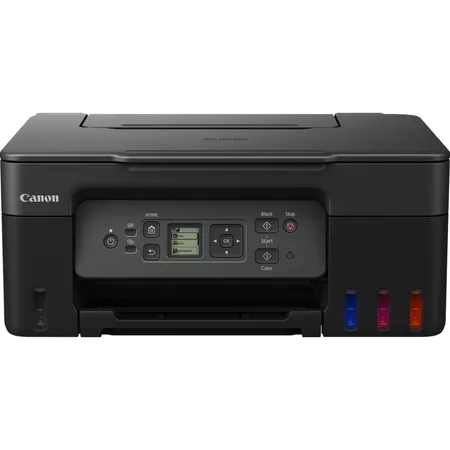
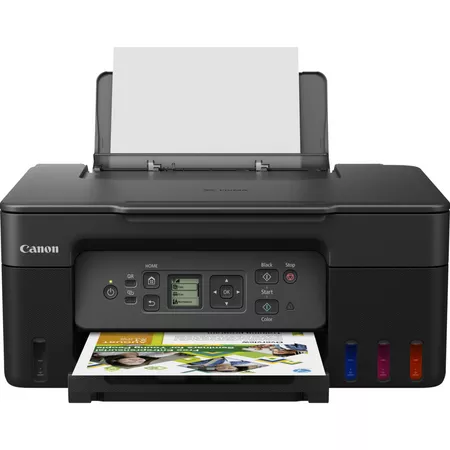
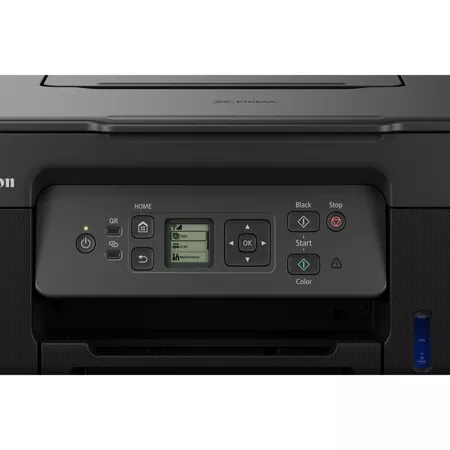
Reduce home printing expenses to a minimum with the fast, high-volume G3570 3-in-1 MegaTank printer with refillable ink, which offers low total cost of ownership over its lifetime. Print, copy and scan using a wide variety of media, with excellent results for both documents and images thanks to borderless photo printing. Enjoy seamless connection to computers and smart devices via fast Wi-Fi. Easy to use thanks to simple controls, a 3.4 cm display, a user-replaceable maintenance cartridge and no-squeeze, no-mess refills, it’s the perfect everyday printer for home use.
Ultra-Low Running Costs
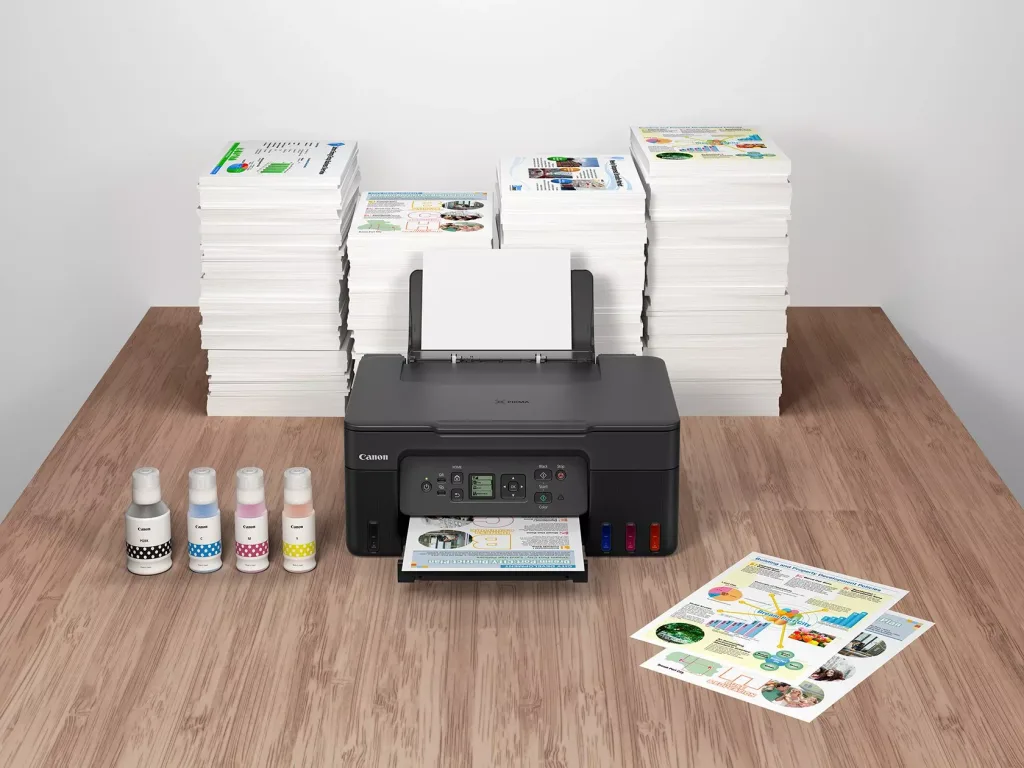
Make huge savings over the printer’s lifetime thanks to refillable high-yield ink tanks that can deliver 6,000 A4 pages with the black ink bottle and 7,700 A4 pages with a full set of colour ink bottles. Print 26% more pages in Economy mode to make your ink go even further.
At Tommie Kelly Euronics shop Canon printers with Canon PIXMA G3570 Wireless Colour 3-in-1 Refillable MegaTank . Reduce printing expenses to a minimum with the fast, high-volume printer with refillable ink.
Ultra-low running costs with Canon PIXMA G3570 Wireless Printer
Make huge savings over the printer’s lifetime thanks to refillable high-yield ink tanks that can deliver 6,000 A4 pages with the black ink bottle and 7,700 A4 pages¹ with a full set of colour ink bottles. Print 26% more pages² in Economy mode to make your ink go even further.
Canon PIXMA G3570 Wireless Colour 3-in-1 Refillable MegaTank Printer, Black
Simple operation and mess-free refills
Easy, straightforward day-to-day use thanks to a clear 3.4 cm LCD panel and single-action print head installation. Keep downtime to minimum with the user-replaceable maintenance cartridge and no-squeeze, key-coded ink bottles.
Have your prints ready in seconds with Canon PIXMA G3570 Wireless Printer
Get your documents quicker thanks to fast print speeds of 11.0 ipm (mono) and 6.0 ipm³ (colour) and print for longer thanks to a 100-sheet paper capacity.
Seamless wireless connectivity
Print effortlessly straight from a range of devices thanks to Wi-Fi connectivity and support for PIXMA Cloud Link, Canon PRINT app, Apple AirPrint and more.
Work with more media
Get creative with the ability to print on more media types including magnetic, glossy and matte photo paper.
Software to expand your creative horizons
Create professional-looking documents, posters, cards, calendars and more with Easy Photo-Print Editor software and Creative Park’s free paper craft materials. This printer is compatible with Windows, Chrome OS and Mac OS⁴.
Small footprint, low waste
Compact dimensions (416 x 337 x 177 mm) make this printer ideal for homes of all sizes, while its low ink waste and recyclable packaging makes it more sustainable too.
Colour ways to suit your style
Make sure your printer suits its surroundings – or stands out – with a choice of three colour finishes.
Canon Printers Delivered Throughout Ireland
At Tommie Kelly Euronics we offer nationwide delivery and removal of old appliance for Weee recycling. For more information please contact Tommie Kelly Euronics Main Street, Roscommon Town, 090 6634465 or Dunlo Street, Ballinasloe, Co. Galway 090 9644093.
Plain Paper Red Label Superior 80 g/m2 (WOP111),
Canon Oce Office Colour Paper 80 g/m2 (SAT213)
Photo Paper Pro Luster (LU-101),
Photo Paper Plus Glossy II (PP-201)
Matte Photo Paper (MP-101),
Glossy Photo Paper “Everyday Use” (GP-501)
High Resolution Paper (HR-101N),
Envelope,
Photo Paper Plus Semi-gloss (SG-201),
Greeting Card (manufactured by Avery and RedRiverPaper),
Cardstock (manufactured by Neenah Paper and INKPRESS),
Restickable Photo Paper(RP-101)
Magnetic Photo Paper(MG-101)
Dark Fabric Iron on Transfers (DF-101),
Light Fabric Iron on Transfers (LF-101),
Double sided Matte Paper (MP-101D)
Maximum Paper Input
Rear Tray: Max. 100 sheets (plain paper)
Paper Sizes
A4, A5, A6, B5, LTR, LGL, Executive (184.2 mm x 266.7 mm), Legal(215 mm x 345 mm), 4″ x 6″, 5″ x 7″, 7″ x 10″, 8″ x 10″, Envelopes DL, Envelopes COM10, Envelopes C5, Square (89 mm x 89 mm), Square (127 mm x 127 mm), Card Size(91 mm x 55 mm)
[Custom size] width 55 mm – 216 mm, length 89 mm – 1200 mm
Paper Weight
Rear Tray: Plain paper: 64 – 105 g/m²
Canon specialty paper: max paper weight : approx. 265 g/m2
(Photo Paper Plus Glossy II PP-201)
Windows 11, Windows 10、Windows 8.1、Windows 7 SP1
Operation can only be guaranteed on a PC with pre-installed Windows 7or later.
Printer driver,IJ Printer Assistant Tool and IJ Network Device Setup Utility are available with following OS.
Windows Server 2008 R2 SP1、Windows Server 2012 R2、Windows Server 2016、Windows Server 2019、Windows Server 2022
Mac: OS X 10.14.6 ~ macOS 12
Chrome OS
Mobile Operating Systems: iOS®, Android™55
Minimum System Requirements
Windows: 2.0GB or more
Mac: 1.0GB or more
Note: for bundled software installation. The necessary amount of hard disk space required.
Display: 1024 x 768 XGA
Software Included
Printer Driver
IJ Printer Assistant Tool
Physical Features
Weight
approx. 6.0 kg
Dimensions (W x D x H)
Approx. 416 x 337 x 177 mm (with trays retracted)
Approx. 416 x 557 x 268 mm (with trays extended)
Standard disclaimers
All specifications subject to change without notice.Print speed may vary depending on system configuration, interface, software, document complexity, print mode, page coverage, type of paper used etc.
Ink yield may vary depending on texts/photos printed, applications software used, print mode and type of paper used. For yield information see www.canon-europe.com/ink/yield.
All brand and product names are trademarks of their respective companies.
Microsoft, Windows and the Windows logo are trademarks, or registered trademarks of Microsoft Corporation in the United States and/or other countries.
Ink droplets can be placed with a minimum pitch of 1/4800 inch
A4 document print speed on plain paper is measured based on average of ESAT in Office Category Test of ISO/IEC 24734 standard.
A4 document print speed on plain paper is measured based on average of ESAT in Office Category Test of ISO/IEC 24734 standard.
Photo print speed is based on default driver setting using ISO/JIS-SCID N2 standard on Canon Photo Paper Plus Glossy II and does not take into account data processing time on host computer.
Paper types NOT supported for borderless printing are as follows: Envelope, High Resolution Paper, T-Shirt Transfer, Photo Stickers
Page Yield is the estimated value based on Canon individual test method using the ISO/IEC 24712 chart and continuous printing simulation with the replacement after initial setup.
The economy mode reduces the black ink consumption by lowering the density, 26% more pages than the standard mode can be printed
The economy mode reduces the black ink consumption by lowering the density, 26% more pages than the standard mode can be printed
Page Yield is the estimated value based on Canon individual test method using the ISO/IEC 29103 chart and continuous printing simulation with the replacement after initial setup.
Optical resolution is a measure of maximum hardware sampling resolution, based on ISO 14473 standard.
The fastest speed in Hi-Speed USB on Windows PC. Transfer time to computer is not included.
The fastest speed in Hi-Speed USB on Windows PC. Transfer time to computer is not included.
Colour document copy speed is measured based on average of sFCOT and sESAT in Performance Test of ISO/IEC 29183 standard. Copy speed may vary depending on document complexity, copy mode, page coverage, type of paper used etc. and does not take into account warming up time.
Colour document copy speed is measured based on average of sFCOT and sESAT in Performance Test of ISO/IEC 29183 standard. Copy speed may vary depending on document complexity, copy mode, page coverage, type of paper used etc. and does not take into account warming up time.
Requires an Internet connection and the Canon PRINT Inkjet/SELPHY app, available for free on the App Store and at Google Play. Compatible with iPad, iPhone 3GS or later, and iPod touch 3rd generation or later devices running iOS 7.0 or later, and Android mobile devices running Android 2.3.3 or later. Your device must be connected to the same working network with wireless 802.11 b/g/n/a capability as your printer. Requires a compatible social media account and is subject to that social media accounts Terms of Service. Certain exceptions may apply.
Requires an Internet connection and the Creative Park app, available for free on the App Store and at Google Play. Compatible with iOS 12.0 or later/Android OS 5.0 or later operating systems. You must have a Canon ID and a Canon inkjet printer to use this app.
The Easy-PhotoPrint Editor software requires an Internet connection and is compatible with the following operating systems; Microsoft Windows 10 (64-bit/32-bit), Microsoft Windows 8.1 (64-bit/32-bit), Microsoft Windows 7 SP1 (64-bit/32-bit), macOS High Sierra v10.13, macOS Sierra v10.12, Mac OS X El Capitan v10.11 and Mac OS X El Capitan v10.10.5. Minimum Windows and macOS/Mac OS X requirements are: 2GB of RAM and a monitor with 1024×768 resolution. The Easy-PhotoPrint Editor mobile application requires an Internet connection and the Easy-PhotoPrint Editor app v1.1.0, available for free on the App Store and at Google Play. Compatible with iPad Air2 (2nd Generation), iPad Mini 4 and iPhone 6s or later devices running iOS 10 or later, and Android mobile devices running Android 5.x or later. Certain exceptions may apply. The following file formats are supported: JPEG, PNG, HEIF (devices running iOS 11 and mac OS v10.13 or later), DLP save data, Poster Artist export data, EasyPhoto+ export data, Easy-PhotoPrint Editor export data.
The Easy-PhotoPrint Editor software requires an Internet connection and is compatible with the following operating systems; Microsoft Windows 10 (64-bit/32-bit), Microsoft Windows 8.1 (64-bit/32-bit), Microsoft Windows 7 SP1 (64-bit/32-bit), macOS High Sierra v10.13, macOS Sierra v10.12, Mac OS X El Capitan v10.11 and Mac OS X El Capitan v10.10.5. Minimum Windows and macOS/Mac OS X requirements are: 2GB of RAM and a monitor with 1024×768 resolution. The Easy-PhotoPrint Editor mobile application requires an Internet connection and the Easy-PhotoPrint Editor app v1.1.0, available for free on the App Store and at Google Play. Compatible with iPad Air2 (2nd Generation), iPad Mini 4 and iPhone 6s or later devices running iOS 10 or later, and Android mobile devices running Android 5.x or later. Certain exceptions may apply. The following file formats are supported: JPEG, PNG, HEIF (devices running iOS 11 and mac OS v10.13 or later), DLP save data, Poster Artist export data, EasyPhoto+ export data, Easy-PhotoPrint Editor export data.
Requires an Internet connection and the Canon PRINT Inkjet/SELPHY app, available for free on the App Store and at Google Play. Compatible with iPad, iPhone 3GS or later, and iPod touch 3rd generation or later devices running iOS 7.0 or later, and Android mobile devices running Android 2.3.3 or later. Your device must be connected to the same working network with wireless 802.11 b/g/n/a capability as your printer. Requires a compatible social media account and is subject to that social media accounts Terms of Service. Certain exceptions may apply.
Canon Print Service is a print plug-in for Android smart devices, which enables printing from Android v4.4 – v5.0 devices to many Canon printers via a Wi-Fi network. The plug-in does not work as a standalone app. Available for free at Google Play.
AirPrint functionality requires a compatible iPad, iPhone, or iPod Touch device running iOS 7.0 or later, and an AirPrint-enabled printer connected to the same network as your iOS device. A printer connected to the USB port of your Mac, PC, AirPort Base station, or Time Capsule is not supported.
Requires a smart device with the Canon PRINT Inkjet/SELPHY app installed and connected to the desired active wireless network to complete cableless setup.
Requires Android mobile device with Android 4.4 operating system or later with the Mopria Print Service pre-loaded with that device and the compatible PIXMA printer on the same wireless network. The Mopria experience is also available on Android 4.4 mobile devices with a download of the Mopria Print Service from Google Play.
Requires an active smart assistant account linked and accompanying app enabled, the smart device and printer to be actively connected with permission to the Canon Inkjet Cloud Printing Center, and the required action(s), skill(s), or applet(s) available/enabled to the compatible printer. Voice commands can not be displayed as text on Amazon smart devices with screens. Only English, French and German supported.
Requires an active smart assistant account linked and accompanying app enabled, the smart device and printer to be actively connected with permission to the Canon Inkjet Cloud Printing Center, and the required action(s), skill(s), or applet(s) available/enabled to the compatible printer. Voice commands can not be displayed as text on Amazon smart devices with screens. Only English, French and German supported.
Some functions may not be available with these Operating Systems. Please refer to the manual or website for details.
Plain Paper(A4, B/W). Acoustic Noise is measured based on ISO7779 standard.
Copy: When copying ISO/JIS-SCID N2 (printed by inkjet printer) on A4 size plain paper using default settings.
Typical Electricity Consumption (TEC) value: TEC value was calculated assuming the unit will be constantly switched among operational mode, sleep mode, and power-off mode for 5 days, and that it will be either in sleep or power-off mode for the remaining 2 days within the same week. The TEC value of this product is calculated by Canon on their own accord using TEC measurement procedure regulated in International ENERGY STAR Program.
Ink droplets can be placed with a minimum pitch of 1/4800 inch
A4 document print speed on plain paper is measured based on average of ESAT in Office Category Test of ISO/IEC 24734 standard.
A4 document print speed on plain paper is measured based on average of ESAT in Office Category Test of ISO/IEC 24734 standard.
Photo print speed is based on default driver setting using ISO/JIS-SCID N2 standard on Canon Photo Paper Plus Glossy II and does not take into account data processing time on host computer.
Paper types NOT supported for borderless printing are as follows: Envelope, High Resolution Paper, T-Shirt Transfer, Photo Stickers
Page Yield is the estimated value based on Canon individual test method using the ISO/IEC 24712 chart and continuous printing simulation with the replacement after initial setup.
The economy mode reduces the black ink consumption by lowering the density, 26% more pages than the standard mode can be printed
The economy mode reduces the black ink consumption by lowering the density, 26% more pages than the standard mode can be printed
Page Yield is the estimated value based on Canon individual test method using the ISO/IEC 29103 chart and continuous printing simulation with the replacement after initial setup.
Optical resolution is a measure of maximum hardware sampling resolution, based on ISO 14473 standard.
The fastest speed in Hi-Speed USB on Windows PC. Transfer time to computer is not included.
The fastest speed in Hi-Speed USB on Windows PC. Transfer time to computer is not included.
Colour document copy speed is measured based on average of sFCOT and sESAT in Performance Test of ISO/IEC 29183 standard. Copy speed may vary depending on document complexity, copy mode, page coverage, type of paper used etc. and does not take into account warming up time.
Colour document copy speed is measured based on average of sFCOT and sESAT in Performance Test of ISO/IEC 29183 standard. Copy speed may vary depending on document complexity, copy mode, page coverage, type of paper used etc. and does not take into account warming up time.
Requires an Internet connection and the Canon PRINT Inkjet/SELPHY app, available for free on the App Store and at Google Play. Compatible with iPad, iPhone 3GS or later, and iPod touch 3rd generation or later devices running iOS 7.0 or later, and Android mobile devices running Android 2.3.3 or later. Your device must be connected to the same working network with wireless 802.11 b/g/n/a capability as your printer. Requires a compatible social media account and is subject to that social media accounts Terms of Service. Certain exceptions may apply.
Requires an Internet connection and the Creative Park app, available for free on the App Store and at Google Play. Compatible with iOS 12.0 or later/Android OS 5.0 or later operating systems. You must have a Canon ID and a Canon inkjet printer to use this app.
The Easy-PhotoPrint Editor software requires an Internet connection and is compatible with the following operating systems; Microsoft Windows 10 (64-bit/32-bit), Microsoft Windows 8.1 (64-bit/32-bit), Microsoft Windows 7 SP1 (64-bit/32-bit), macOS High Sierra v10.13, macOS Sierra v10.12, Mac OS X El Capitan v10.11 and Mac OS X El Capitan v10.10.5. Minimum Windows and macOS/Mac OS X requirements are: 2GB of RAM and a monitor with 1024×768 resolution. The Easy-PhotoPrint Editor mobile application requires an Internet connection and the Easy-PhotoPrint Editor app v1.1.0, available for free on the App Store and at Google Play. Compatible with iPad Air2 (2nd Generation), iPad Mini 4 and iPhone 6s or later devices running iOS 10 or later, and Android mobile devices running Android 5.x or later. Certain exceptions may apply. The following file formats are supported: JPEG, PNG, HEIF (devices running iOS 11 and mac OS v10.13 or later), DLP save data, Poster Artist export data, EasyPhoto+ export data, Easy-PhotoPrint Editor export data.
The Easy-PhotoPrint Editor software requires an Internet connection and is compatible with the following operating systems; Microsoft Windows 10 (64-bit/32-bit), Microsoft Windows 8.1 (64-bit/32-bit), Microsoft Windows 7 SP1 (64-bit/32-bit), macOS High Sierra v10.13, macOS Sierra v10.12, Mac OS X El Capitan v10.11 and Mac OS X El Capitan v10.10.5. Minimum Windows and macOS/Mac OS X requirements are: 2GB of RAM and a monitor with 1024×768 resolution. The Easy-PhotoPrint Editor mobile application requires an Internet connection and the Easy-PhotoPrint Editor app v1.1.0, available for free on the App Store and at Google Play. Compatible with iPad Air2 (2nd Generation), iPad Mini 4 and iPhone 6s or later devices running iOS 10 or later, and Android mobile devices running Android 5.x or later. Certain exceptions may apply. The following file formats are supported: JPEG, PNG, HEIF (devices running iOS 11 and mac OS v10.13 or later), DLP save data, Poster Artist export data, EasyPhoto+ export data, Easy-PhotoPrint Editor export data.
Requires an Internet connection and the Canon PRINT Inkjet/SELPHY app, available for free on the App Store and at Google Play. Compatible with iPad, iPhone 3GS or later, and iPod touch 3rd generation or later devices running iOS 7.0 or later, and Android mobile devices running Android 2.3.3 or later. Your device must be connected to the same working network with wireless 802.11 b/g/n/a capability as your printer. Requires a compatible social media account and is subject to that social media accounts Terms of Service. Certain exceptions may apply.
Canon Print Service is a print plug-in for Android smart devices, which enables printing from Android v4.4 – v5.0 devices to many Canon printers via a Wi-Fi network. The plug-in does not work as a standalone app. Available for free at Google Play.
AirPrint functionality requires a compatible iPad, iPhone, or iPod Touch device running iOS 7.0 or later, and an AirPrint-enabled printer connected to the same network as your iOS device. A printer connected to the USB port of your Mac, PC, AirPort Base station, or Time Capsule is not supported.
Requires a smart device with the Canon PRINT Inkjet/SELPHY app installed and connected to the desired active wireless network to complete cableless setup.
Requires Android mobile device with Android 4.4 operating system or later with the Mopria Print Service pre-loaded with that device and the compatible PIXMA printer on the same wireless network. The Mopria experience is also available on Android 4.4 mobile devices with a download of the Mopria Print Service from Google Play.
Requires an active smart assistant account linked and accompanying app enabled, the smart device and printer to be actively connected with permission to the Canon Inkjet Cloud Printing Center, and the required action(s), skill(s), or applet(s) available/enabled to the compatible printer. Voice commands can not be displayed as text on Amazon smart devices with screens. Only English, French and German supported.
Requires an active smart assistant account linked and accompanying app enabled, the smart device and printer to be actively connected with permission to the Canon Inkjet Cloud Printing Center, and the required action(s), skill(s), or applet(s) available/enabled to the compatible printer. Voice commands can not be displayed as text on Amazon smart devices with screens. Only English, French and German supported.
Some functions may not be available with these Operating Systems. Please refer to the manual or website for details.
Plain Paper(A4, B/W). Acoustic Noise is measured based on ISO7779 standard.
Copy: When copying ISO/JIS-SCID N2 (printed by inkjet printer) on A4 size plain paper using default settings.
Typical Electricity Consumption (TEC) value: TEC value was calculated assuming the unit will be constantly switched among operational mode, sleep mode, and power-off mode for 5 days, and that it will be either in sleep or power-off mode for the remaining 2 days within the same week. The TEC value of this product is calculated by Canon on their own accord using TEC measurement procedure regulated in International